

When workplace safety is discussed, the conversation usually focuses on personal protective equipment, safety training, hazard identification, fire protection and emergency procedures.
These are essential.
However, there is another layer of workplace protection that is increasingly important in modern industrial environments: controlling who can enter specific areas, when they can enter and what level of access they are permitted to have.
This is where access control systems become relevant to occupational health and safety.
An effective access control system can help industrial organizations restrict unauthorized movement, control access to hazardous areas, improve accountability and support emergency response.
For oil and gas companies, manufacturing plants, warehouses, energy facilities, engineering workshops and other high-risk workplaces, access control should therefore be considered as part of a broader integrated safety and security strategy.
Unlike traditional locks and keys, modern access control solutions can use cliometric identification, RFID cards, PINs and other credentials to determine who is authorised to enter a specific area. However, the effectiveness of any system depends heavily on proper planning, installation, wiring, configuration and testing.
This guide explains how access control systems work, the components involved, the installation process and what to consider when choosing an access control solution in Nigeria.
What Is an Access Control System?
An access control system is a security solution designed to control and monitor access to a building, room, facility or restricted area.
Instead of relying solely on physical keys, the system verifies an individual’s credentials before granting access. Depending on the system, these credentials may include:
- Fingerprint biometrics Facial recognition RFID cards Proximity cards PIN codes Mobile credentials Smart cards Electronic door locks Turnstiles Access control software
- Facial recognition
- RFID cards
- Proximity cards
- PIN codes
- Mobile credentials
A typical system connects an access reader to a controller, which communicates with an electronic locking mechanism. When an authorised credential is presented, the controller sends a signal to release the lock or activate the relevant access point.
This makes access control useful for organisations that need greater control, accountability and visibility over who enters their facilities.
How Does an Access Control System Work?
The basic operation of an access control system can be represented as:
User presents credential → Reader verifies credential → Controller checks permission → Access is granted or denied → Entry event is recorded
For example, an employee may present an RFID card or fingerprint at an access reader. The reader sends the credential information to the access control panel. If the user has the appropriate permission, the controller activates the door lock or turnstile.
For larger installations, the system can also connect to management software, allowing authorised administrators to manage users, access levels, schedules and entry records.
Main Components of an Access Control System
A properly designed system may contain several components depending on the size and security requirements of the facility.
1. Access Control Reader
The reader is the point where a user presents their credential.
Common options include:
- RFID card readers
- Fingerprint readers
- Facial recognition terminals
- PIN/keypad readers
- Multi-factor authentication readers
2. Access Control Panel
The access control panel is the central controller of the system. It receives information from the reader and determines whether access should be granted based on the permissions configured within the system.
3. Electronic Locking Mechanism
The locking device physically controls the door or access point.
Depending on the application, this may include:
- Electromagnetic locks
- Electric strikes
- Motorized locks
- Electric door locks
- Turnstile mechanisms
4. Exit Button
An exit button provides a simple way for an authorised person to exit through a controlled door from the secure side.
5. Door Position Sensor
This sensor allows the system to determine whether a door is open or closed. It can also support monitoring and alerts when a controlled door remains open longer than expected.
6. Power Supply and Backup
Reliable power is essential for access control. A suitable power supply and backup battery can help maintain system availability during power interruptions.
7. Access Control Software
For larger installations, management software allows administrators to create users, assign access permissions, monitor activity and generate reports.
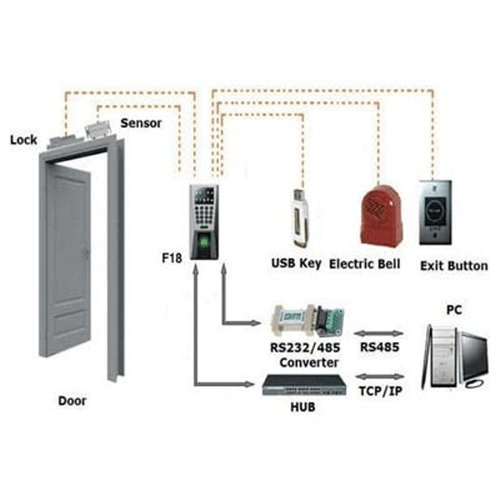
Access Control System Diagram
Understanding the relationship between the different components makes it easier to understand how an access control system operates.
A basic access control system diagram typically shows the connection between the:
- Access reader
- Access control panel
- Electronic lock
- Exit button
- Door sensor
- Power supply
- Management software or network
The exact configuration will depend on the type of access point, hardware manufacturer and security requirements of the facility.
For this reason, an access control schematic should be developed around the actual equipment being installed rather than relying on a generic diagram.
Access Control System Installation Process
Professional access control installation should begin before any equipment is mounted. The system needs to be designed around the facility, user requirements and existing infrastructure.
Step 1: Site Assessment
The first stage is to assess the location and determine the security requirements.
This includes reviewing:
- Number of doors or access points
- Type and condition of doors
- Expected number of users
- Areas requiring restricted access
- Existing security infrastructure
- Power availability
- Network requirements
- Emergency exit requirements
A site assessment helps prevent problems that could arise from selecting equipment without considering the physical environment.
Step 2: System Design
After the assessment, the appropriate access control architecture can be developed.
The design should determine:
- Type of authentication required
- Number of access points
- Controller capacity
- Type of locking mechanism
- Reader locations
- Cable routes
- Power requirements
- Communication requirements
- Backup power requirements
- Integration with other security systems
For larger facilities, the design may include multiple controllers connected to a central management system.
Step 3: Hardware Installation
Once the design has been approved, the hardware can be installed.
Depending on the project, this may involve installing:
- Biometric or RFID readers
- Access control panels
- Electronic locks
- Door sensors
- Exit buttons
- Power supplies
- Turnstiles
- Network equipment
The equipment should be positioned appropriately to provide reliable operation while maintaining the appearance and functionality of the facility.
Access Control System Wiring
Wiring is one of the most important parts of an access control installation.
The system may require connections between the reader, controller, locking mechanism, exit button, door sensor and power supply.
A typical door access control system wiring diagram may therefore include:
Reader → Access Control Panel → Electronic Lock
with additional connections from the:
Exit Button → Access Control Panel
and
Door Sensor → Access Control Panel
The actual wiring arrangement depends on the hardware specification and system architecture.
Incorrect wiring can result in problems such as intermittent access, unreliable locks, communication failures or complete system failure. Professional installation should therefore follow the manufacturer’s wiring requirements and the approved system design.
Biometric Access Control System Installation
Biometric access control provides an additional level of identity verification by using unique physical characteristics.
Common cliometric technologies include:
- Fingerprint recognition
- Facial recognition
- Iris recognition
- Palm recognition
Biometric systems are particularly useful where organisations need to associate access with an individual rather than a physical card or key.
For example, a fingerprint access system can verify an employee’s identity before allowing access to a restricted office, server room, production area or other controlled location.
The installation process typically involves mounting the cliometric reader, connecting it to the access controller, configuring the software and enrolling authorised users.
Access Control for Offices, Industrial Facilities and Residential Properties
There is no single access control system that is suitable for every facility.
Corporate Offices
Offices may require:
- RFID card access
- Biometric authentication
- Visitor management
- Time and attendance integration
- Restricted access to sensitive areas
Industrial Facilities
Industrial environments may require more robust access control solutions for:
- Personnel entrances
- Restricted production areas
- Warehouses
- Control rooms
- Equipment areas
- High-security zones
Turnstiles can also be used to manage pedestrian movement at busy facility entrances.
Residential Estates
Residential developments can benefit from:
- RFID access
- Biometric access
- Vehicle and pedestrian access control
- Visitor management
- Gate automation
The right solution depends on the number of residents, traffic volume, security requirements and existing infrastructure.
Common Access Control Installation Mistakes
Poor installation can compromise an otherwise capable security system.
Some common issues include:
- Selecting incompatible hardware
- Incorrect wiring
- Poor reader positioning
- Inadequate power supply
- No backup power provision
- Poor cable management
- Incorrect access permissions
- Failure to test emergency release functions
- Insufficient consideration of future expansion
- Installing equipment without conducting a proper site assessment
Professional system design and commissioning can significantly reduce these risks.
Can Access Control Be Integrated With CCTV?
Yes. Access control can form part of a broader electronic security infrastructure.
Depending on the equipment and system architecture, access control may be integrated with technologies such as:
- CCTV surveillance
- Intrusion detection
- Fire alarm systems
- Visitor management
- Time and attendance systems
- Building management systems
Integration can provide security teams with better visibility of events across a facility.
For example, an access event can be associated with CCTV footage, making it easier to investigate suspicious or unauthorised activity.
How Much Does Access Control Installation Cost in Nigeria?
The cost of installing an access control system in Nigeria varies significantly from one project to another.
Factors that can affect the cost include:
- Number of doors or access points
- Type of authentication technology
- Number of users
- Type of electronic lock
- Biometric or RFID requirements
- Turnstile integration
- Cabling requirements
- Access control software
- Network infrastructure
- Backup power
- Integration with CCTV or other systems
- Installation complexity
For this reason, a professional site assessment is usually more useful than relying on a standard price for every installation.
How to Choose the Right Access Control System
Before purchasing an access control system, consider the following questions:
How many people will use the system?
A small office with 20 employees will have different requirements from a large industrial facility with hundreds of users.
How sensitive is the area being protected?
A server room or control room may require stronger authentication than a general office entrance.
Do you need cliometric authentication?
Biometric access can provide identity-based authentication where higher control is required.
Will the system need to integrate with CCTV?
If security monitoring is important, integration with CCTV can provide a more complete picture of access events.
Will the facility expand in the future?
Choosing a scalable system can make it easier to add doors, users and additional security features later.
Why Professional Access Control Installation Matters
An access control system is only as effective as its design and implementation.
Professional installation helps ensure that:
- The correct hardware is selected
- Components are properly connected
- Wiring follows the system design
- Access permissions are configured correctly
- Security devices work together
- Emergency functions are properly tested
- The system is ready for future maintenance and expansion
At Fortitude Plethora Solutions, we provide security and access control solutions designed around the operational requirements of each client. From access control installation and cliometric systems to security surveillance and related infrastructure, our approach focuses on delivering practical and reliable solutions.
Frequently Asked Questions
What is an access control system?
An access control system manages and monitors who is permitted to enter a specific building, room or restricted area using credentials such as cliometric identification, RFID cards, PINs or other authentication methods.
How do you install an access control system?
Installation typically involves a site assessment, system design, hardware installation, wiring, software configuration, user enrolment and system testing. The exact process depends on the type and scale of the system.
What is the difference between cliometric and RFID access control?
Biometric access control verifies a person’s physical characteristic, such as a fingerprint or face. RFID access control typically uses a card or credential assigned to an authorised user.
Can an access control system work during a power outage?
Yes, where an appropriate backup power solution is incorporated into the system. Backup requirements should be determined during the system design stage.
Can access control be connected to CCTV?
Yes. Depending on the equipment and system architecture, access control can be integrated with CCTV and other security technologies to improve monitoring and incident investigation.
Do I need professional installation?
Professional installation is recommended, particularly for multi-door, cliometric, networked or integrated systems. Proper design, wiring, configuration and testing are important for reliable operation.
Secure Your Facility With the Right Access Control Solution
Whether you need access control for a corporate office, residential development, commercial property or industrial facility, choosing the right system is only the beginning. Proper design, installation and configuration are essential to achieving reliable security and controlled access.
Fortitude Plethora Solutions provides professional security and access control solutions tailored to the requirements of your facility.
Need an access control system for your facility? Contact Fortitude Plethora Solutions to discuss your requirements and find the right solution for your project.